For physiotherapists

Create and assign exercise plans to patients.

Build routines, set schedules, and give patients step-by-step exercises in the free Forma app. From the dashboard, you assign plans and see which sessions were completed.

Create an account with Google or email.

Plans start at PLN 99 per month. The patient app is free.

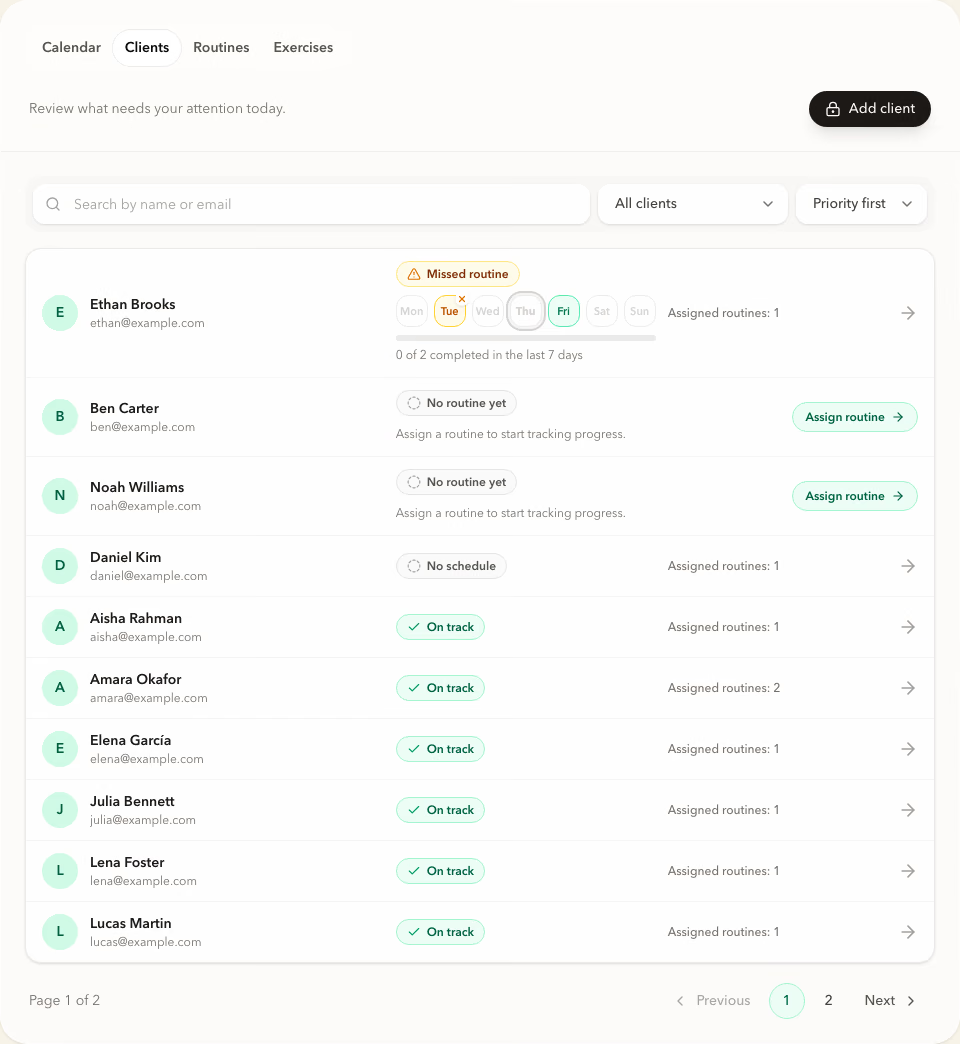
Forma dashboard with a list of patients and plan status

Between appointments

A written plan does not guide a patient through each exercise.

Written instructions show what to do, but they are difficult to follow during a session. Forma keeps the plan, schedule, exercise videos, and your notes available in the patient app.

Physiotherapist dashboard

Keep assigned exercises organized between appointments.

Create routines, assign them to patients, set schedules, and review completed sessions. Before the next appointment, you can return to the assigned plan and see what was completed.

  1. Patients and assigned plans

    Review who has an active plan and which routine is assigned.

  2. Reusable routines

    Create a routine once, then adjust and assign it to another patient.

  3. Schedules and completed sessions

    Review each patient’s weekly schedule and completed sessions.

Patient experience

Patients see the plan and how to perform each exercise.

The patient app shows assigned routines, weekly schedules, exercise targets, your notes, and guided sessions step by step.

See the patient app
Forma patient app showing an assigned routine, schedule, and practitioner note
Forma exercise preview with an instruction video, target, and practitioner note

From exercises to an assigned plan

Build the routine. Assign it. Review completion.

Create

Start with a ready-made routine or build your own.

Use a ready-made routine or choose from more than 200 exercises with instruction videos. Set targets and add notes for the patient.

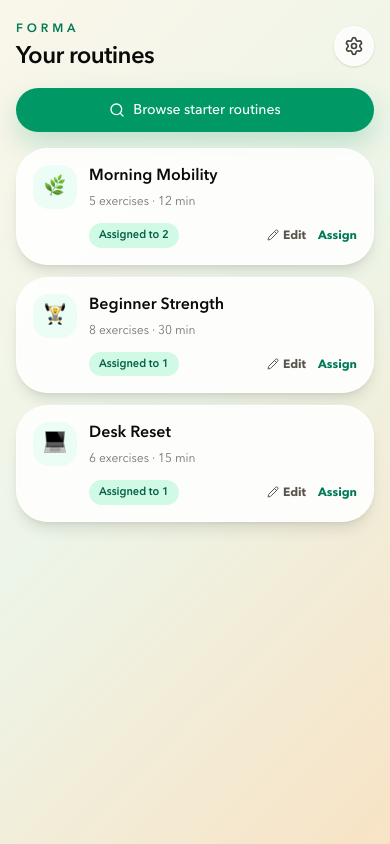
Forma routine list with edit and assign actions

Generate with AI

Turn a written protocol into a routine.

Paste the exercise plan you already wrote down and Forma drafts a routine from it, matched to real exercises from the library with sets and reps filled in. You review and edit the draft before anything is saved.

Forma AI routine draft built from pasted notes, with matched exercises and sets

Invite and assign

Assign the plan and set the schedule.

Send a personal invite link, assign a routine, and select exercise days. The patient sees the plan in the free Forma app.
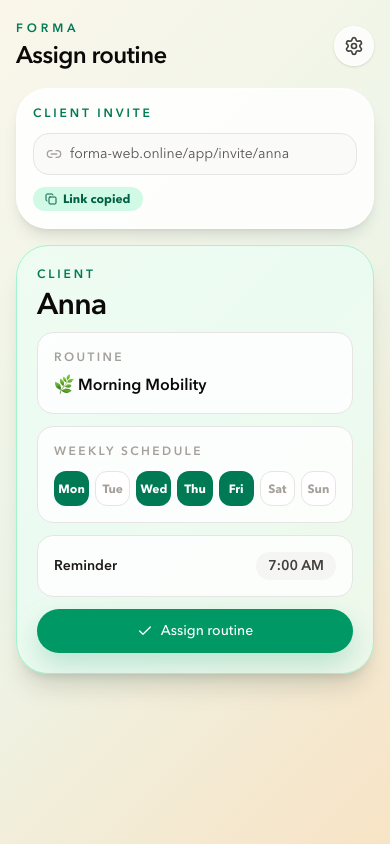
Forma assignment screen with an invite link and weekly schedule

Review

Return to the plan before the next appointment.

Completed sessions appear in the dashboard. Review the weekly schedule and see where a planned session was not completed.
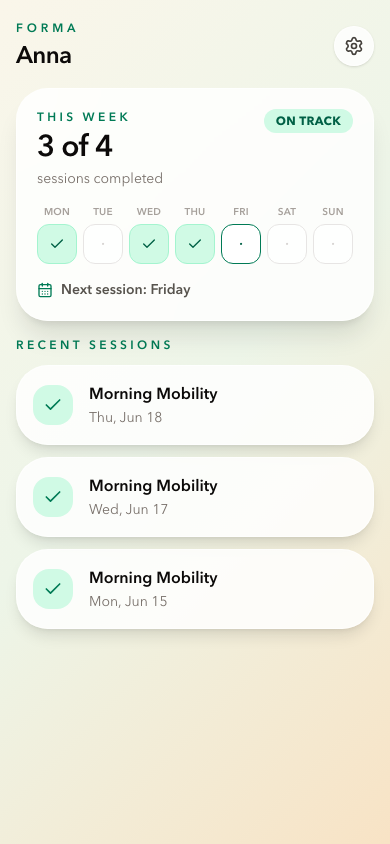
Forma patient view with a weekly plan and completed sessions

Interactive demo

See how exercise plans are organized between appointments.

Open a sample dashboard and review patients, routines, schedules, and completed sessions. No registration is required.

No account required. Demo changes are not saved.

Check before you decide

See how Forma works before creating an account.

Pricing for physiotherapists

Choose the patient limit that fits your practice.

Every plan includes the dashboard, ready-made routines, more than 200 exercises with instruction videos, patient management, schedules, and session completion tracking.

Start

PLN 99 per month

Up to 15 active patients

For physiotherapists assigning exercise plans to a smaller patient group.

  • 8 AI routine drafts per week
Choose Start

Studio

PLN 499 per month

Up to 250 active patients

For practices and teams working with a high number of patients.

  • 50 AI routine drafts per week
Choose Studio

Prices are monthly. Applicable tax is calculated before payment. Subscriptions renew until cancelled, and invoices and payment details are available in the billing portal. Included AI drafts renew on a rolling 7-day basis; if you need more in the same week, a pack of 10 extra drafts is available as a one-time purchase.

App FAQ for physiotherapists

Questions before assigning the first plan.

Can I try Forma without creating an account?

Yes. The interactive demo shows sample patients, routines, schedules, and completed sessions. It requires no registration and does not save changes.

How does a patient receive an exercise plan?

Send a personal invite link, assign a routine, and select exercise days. The plan appears in the free Forma app with targets, notes, videos, and guided sessions.

Can I prepare exercises for work between appointments?

Yes. Assign a routine and schedule to a patient. Forma presents the exercises step by step and keeps the plan available in the patient app.

Do I need to build every routine from scratch?

No. Start with a ready-made routine or build your own using more than 200 exercises with instruction videos. You can adjust targets and add notes.

Can Forma turn an exercise plan I already wrote into a routine?

Yes. Paste the plan as plain text and Forma drafts a routine from it, matched to exercises from the Forma library with sets and reps filled in. The draft opens in the editor so you can change anything before saving.

Does the AI invent exercises?

No. The draft can only use exercises that already exist in the Forma library, so every matched exercise keeps its Forma instructions and video. Anything the AI cannot match confidently is left for you to review rather than guessed at, and no draft becomes a routine until you confirm it. AI drafts are general exercise guidance, not a medical service, and always need your clinical judgement.

What happens to the text I paste?

It is sent to Google Cloud Vertex AI in the EU to produce the draft and is not stored by Forma. An unconfirmed draft is deleted after 24 hours. Details are in the Privacy Policy and Data Processing Agreement.

Do patients pay to use Forma?

No. The patient app is free. You choose a plan based on the number of active patients.

What is the difference between Start, Pro, and Studio?

The plans differ by active patient limit and by included AI routine drafts. Start includes up to 15 patients and 8 AI drafts per week, Pro up to 50 patients and 20 drafts, and Studio up to 250 patients and 50 drafts. If you need more drafts in the same week, a pack of 10 is a one-time purchase. The core dashboard features are included in every plan.

Can I cancel the subscription and receive invoices?

Yes. Subscription, payment details, and invoices are managed in the billing portal. Renewal, cancellation, and refund terms are described in the Terms of Service.

How does Forma handle patient data?

Forma provides a Data Processing Agreement. Details are available in the Privacy Policy and Data Processing Agreement.

Prepare the next exercise plan in Forma.

Create an account and assign your first routine, or review sample patients in the interactive demo.